HMI Screen Selection Guide
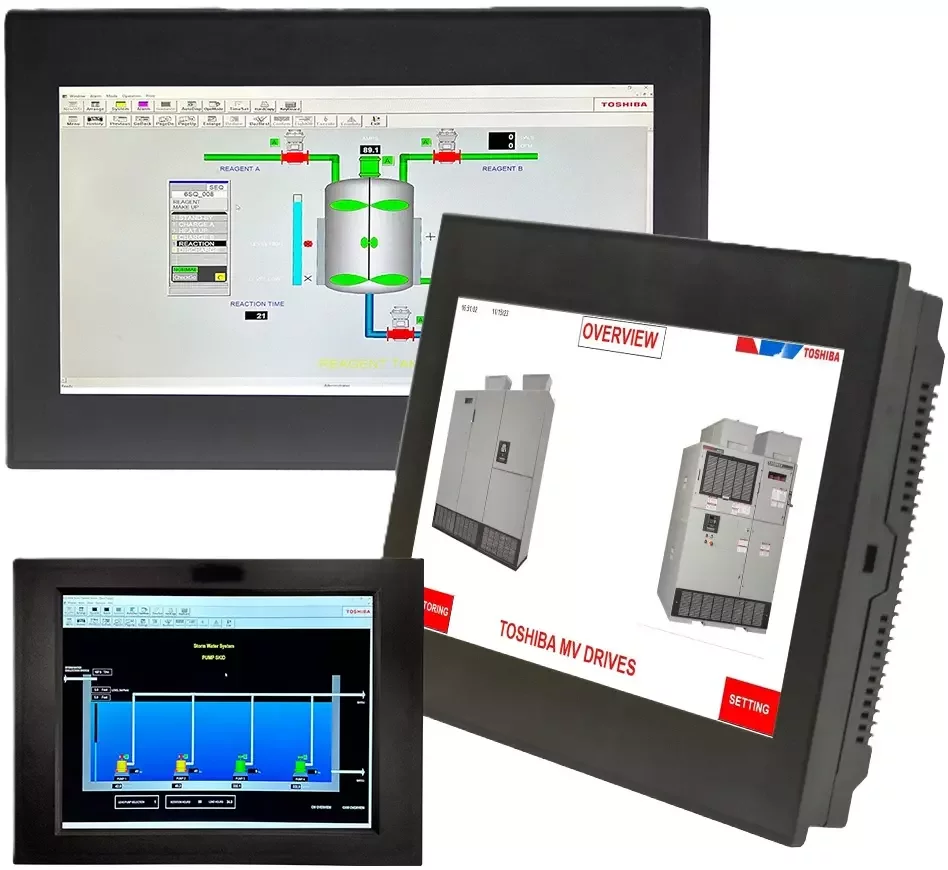
Need help matching an HMI screen to your control system?
👉 Clipper Controls can help evaluate your application requirements, communication needs, environmental conditions, control panel layout, and operator interface goals to recommend the right Toshiba HMI or industrial display solution.
What Is an HMI Screen?
Human Machine Interface Instrument Panel Explained
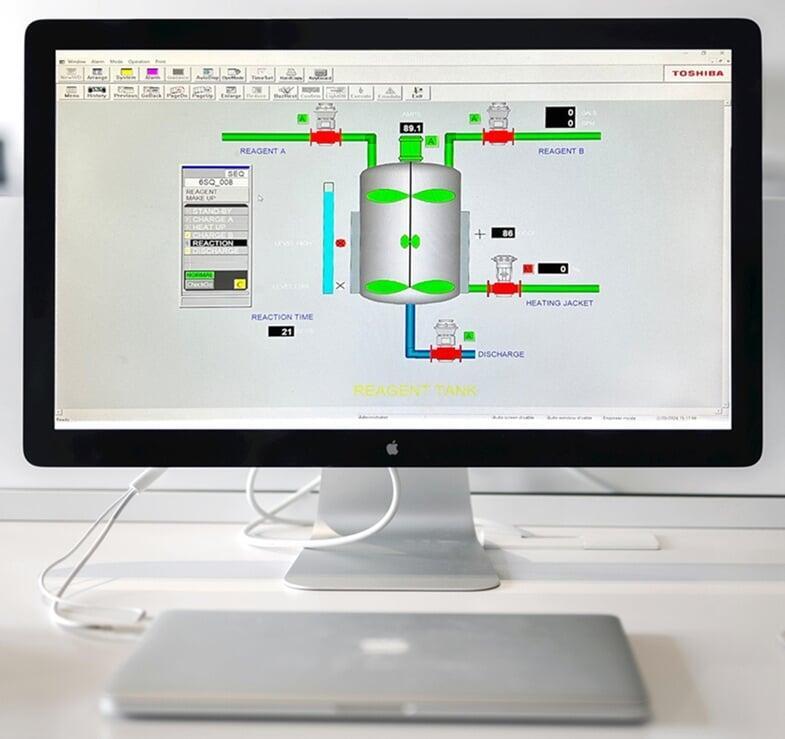
A Human Machine Interface Instrument Panel is designed to present control system information in a way that is clear, organized, and usable for operators. Instead of requiring personnel to interpret raw PLC data or field instrument signals, the HMI organizes that information into graphical screens.
For example, an operator may see a pump icon change color when the pump is running, a tank level rise or fall on a graphic display, or an alarm banner appear when a process variable moves outside its normal range. These visual cues help operators understand what is happening quickly and take action when needed.
An effective industrial operator interface panel should be designed around the way operators actually use the equipment. Screen layouts, alarm priorities, color choices, navigation paths, and data displays should all support fast understanding and safe operation.
Core Functions of an HMI Display
A well-designed HMI display typically supports several important functions.
- Process visualization allows operators to view real-time equipment and process conditions so they can understand system status at a glance.
- Operator control gives users access to touchscreen buttons, menus, and input fields for starting equipment, adjusting setpoints, changing modes, or acknowledging alarms.
- Alarm management helps alert operators to abnormal conditions and prioritize response based on severity.
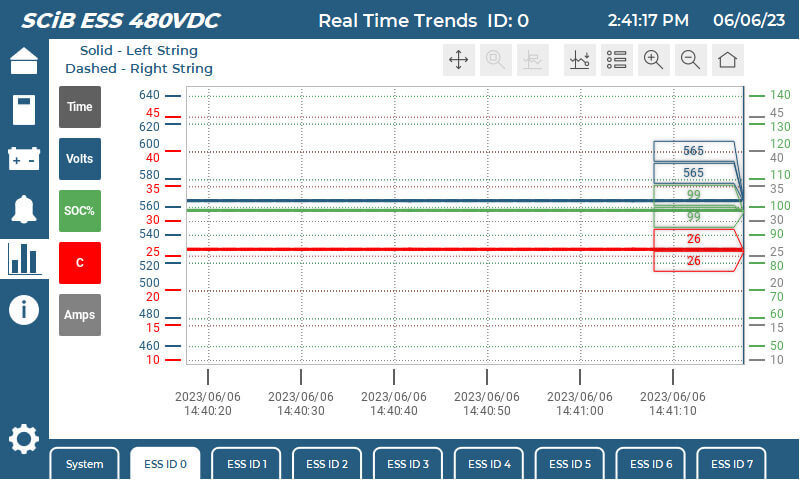
- Trend monitoring allows teams to evaluate process behavior, identify changes, and troubleshoot performance issues.
- Diagnostics give maintenance personnel access to equipment faults, communication status, sensor readings, and system messages.
- Data access can provide production counts, batch information, runtime data, or other operational metrics in connected automation systems.
For machine builders and OEM equipment manufacturers, operator interface panels for industrial equipment can also improve usability and reduce training time. A clear HMI screen gives end users a more intuitive way to operate the system while providing maintenance teams with the information they need to keep equipment running.
👉 Instrumentation Display Solutions
Why HMI Screens Matter in Industrial Automation
An HMI screen is more than a display mounted on a control panel. It is the point where operators, maintenance teams, and production supervisors interact with the automation system. When the interface is clear, responsive, and properly designed, it helps people understand process conditions faster and make better operating decisions.
In industrial environments, small delays or unclear information can affect production quality, equipment uptime, safety, and maintenance response. A well-selected HMI touch panel gives operators immediate access to the information they need, while a poorly specified or poorly designed interface can create confusion, slow troubleshooting, and increase the chance of operator error.
For manufacturers, OEMs, and system integrators, HMI technology supports three major goals: better visibility, better control, and better operational consistency.
Process Visibility
Industrial processes generate a constant stream of data from PLCs, sensors, drives, valves, analyzers, and other connected devices. Without a clear interface, that information can be difficult for operators to interpret quickly.
An HMI display organizes this information into usable screens. Operators can view machine status, production counts, tank levels, temperatures, pressures, flow rates, alarm conditions, and equipment runtime from one interface. For process applications, an industrial HMI display for process control helps personnel monitor changing conditions and respond before small issues become larger disruptions.
For example, in a water treatment system, an HMI may show pump status, basin level, flow rate, chemical feed status, and alarm conditions. In a manufacturing cell, the HMI may display machine mode, part count, fault history, recipe selection, and production speed. In both cases, the screen gives operators a practical way to understand system performance in real time.
Clear process visibility also helps supervisors and maintenance teams. When operators can quickly identify abnormal conditions, teams can respond faster, reduce downtime, and make more informed decisions about equipment performance.
Operator Efficiency
A well-designed HMI touch panel can simplify daily operation by reducing the number of physical controls, manual checks, and separate displays required at the equipment level. Instead of moving between switches, meters, and indicator lights, operators can access key functions from a single touchscreen interface.
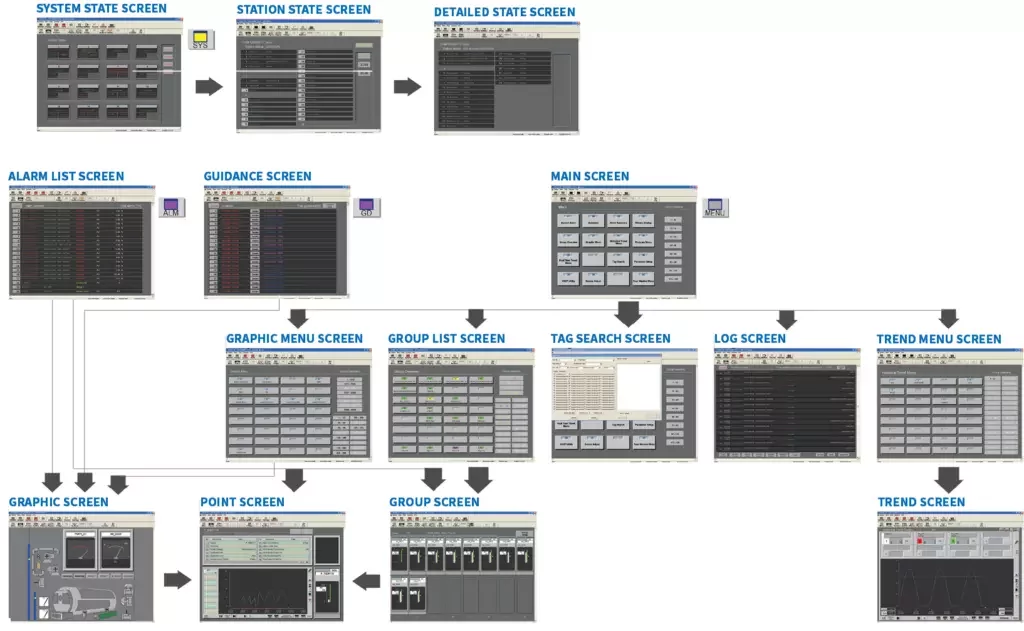
This is especially valuable in facilities where operators manage multiple machines, process areas, or production lines. An intuitive HMI can help users move quickly between overview screens, detailed equipment pages, alarm summaries, trend screens, and setup menus.
Operator efficiency improves when the HMI is designed around real tasks, such as starting or stopping equipment, changing operating modes, adjusting setpoints, selecting recipes, acknowledging alarms, viewing fault details, checking production status, and confirming maintenance conditions.
For machine builders and OEMs, intuitive operator interface panels for industrial equipment can also reduce the amount of training required for end users. When screens are logical and consistent, operators can learn equipment faster and perform routine tasks with greater confidence.
Faster Troubleshooting
Production Consistency
👉 Need Better Operator Visibility and Control?
HMI Touch Panel vs. Industrial Monitor vs. Industrial Panel Computer
HMI Touch Panel
Industrial Touch Screen Monitor
An industrial touch screen monitor is a rugged display with touch capability, often used when the computing hardware is separate from the screen. For example, the monitor may connect to an industrial computer, embedded controller, thin client, or remote workstation.
This configuration is useful when the application requires a larger screen, higher computing performance, centralized processing, or a display that can be replaced independently from the computer.
Industrial touch screen monitors are often used in operator workstations, control rooms, machine visualization stations, SCADA terminals, production monitoring areas, and panel-mounted control interfaces.
When evaluating an industrial touch screen monitor, engineers should consider screen size, brightness, resolution, touch technology, video inputs, USB touch connection, mounting style, and environmental rating.
Industrial Monitor
An Industrial Monitor or Industrial Display may be used when operators need to view information but do not need touchscreen input at that location. These displays can show process graphics, production dashboards, alarm summaries, camera feeds, maintenance information, or SCADA screens.
Industrial monitors are designed for harsher environments than commercial office displays. They may offer rugged enclosures, wider operating temperature ranges, longer lifecycle availability, industrial mounting options, and better resistance to vibration, dust, or electrical noise.
An industrial monitor may be the right choice for control rooms, overview displays, production dashboards, Andon-style displays, maintenance stations, remote monitoring panels, and equipment status screens.
Because these displays may operate continuously, reliability and visibility are critical. Brightness, viewing angle, contrast, enclosure design, and long-term support should all be considered during selection.
Industrial Touch Panel Computer
An industrial touch panel computer combines the display, touchscreen, and computing platform into one integrated device. Instead of connecting a separate monitor to a separate computer, the processor, memory, storage, operating system, and display are built into a single industrial unit.
This type of device is useful when an application needs local computing power at the machine or control panel. Industrial panel computers can support HMI software, data logging, visualization, edge processing, recipe management, barcode integration, or communication with multiple automation systems.
Common uses include industrial panel computers for automation systems, OEM machine interfaces, SCADA operator stations, batch control systems, production data collection, edge computing applications, and equipment diagnostics.
When choosing an industrial touch panel computer, teams should evaluate processor performance, operating system requirements, storage type, memory, communication ports, mounting method, software compatibility, and lifecycle availability.
Integrated Touchscreen HMI
An integrated touchscreen HMI combines operator interface functions into a purpose-built automation device. Depending on the platform, it may include touchscreen hardware, HMI runtime software, communication drivers, alarm handling, graphics development tools, and integration with PLCs or industrial networks.
Integrated touchscreen HMI systems are often preferred when teams want a complete operator interface that is easier to deploy, maintain, and standardize across machines or facilities.
These systems can help simplify operator screen development, PLC communication, alarm display, equipment diagnostics, recipe management, local machine control interfaces, and panel design and installation.
The benefits of integrated touchscreen HMI systems often include cleaner architecture, reduced component count, easier commissioning, and a more consistent operator experience.
Comparison of Common Industrial HMI Hardware Types
The most effective selection is based on the actual role of the device in the automation system. A simple local machine may only require a compact HMI touch panel, while a complex production line may benefit from an industrial panel computer or larger touchscreen monitor connected to SCADA. For OEMs and system integrators, standardizing on the right display platform can also reduce engineering time, simplify spare parts planning, and create a better end-user experience.
| Hardware Type | Best Used For | Key Selection Factors |
|---|---|---|
| HMI touch panel | Machine control and local operator input | PLC compatibility, screen size, software, touch response |
| Industrial monitor | Display-only visualization | Brightness, resolution, mounting, viewing angle |
| Industrial touch screen monitor | Operator stations and control panels | Touch type, durability, enclosure rating, video input |
| Industrial touch panel computer | Integrated computing and display | CPU, memory, operating system, storage, communication ports |
| Integrated touchscreen HMI | Complete operator interface | PLC drivers, HMI software, alarms, graphics, lifecycle support |
👉 Need help comparing HMI touch panels, industrial monitors, and industrial panel computers?
Benefits of Integrated Touchscreen HMI Systems
An integrated touchscreen HMI gives operators a single, purpose-built interface for viewing process information, controlling equipment, responding to alarms, and accessing machine diagnostics. Instead of relying on separate displays, input devices, software platforms, and computing hardware, an integrated HMI can combine key operator interface functions into one streamlined system.
For controls engineers, OEMs, and system integrators, this can reduce design complexity while improving the operator experience. For plant teams, it can make equipment easier to use, troubleshoot, and maintain.
Reduced Panel Complexity
One of the most practical benefits of integrated touchscreen HMI systems is reduced control panel complexity. When display, touch input, communication, and HMI runtime functions are integrated into one device, teams may be able to reduce the number of separate components required inside the enclosure.
This can simplify panel layout, wiring, mounting, device configuration, spare parts planning, startup, and commissioning.
For OEM machine builders, reduced complexity can be especially valuable. A repeatable HMI platform can help standardize panel designs across equipment models, reduce engineering variation, and make it easier to support installed systems in the field.
Easier Operator Interaction
Industrial operators need fast access to the right information. A well-designed integrated touchscreen HMI allows users to move between overview screens, equipment pages, alarms, trends, settings, and maintenance screens without relying on multiple physical controls.
This can improve daily operation by making common tasks easier, including starting and stopping equipment, viewing machine status, adjusting setpoints, selecting recipes, acknowledging alarms, accessing fault details, and checking runtime or production data.
The touchscreen interface can also reduce the number of physical buttons and indicators required on the panel door. This supports cleaner panel design while giving operators a more flexible way to interact with equipment.
Better Data Access
As automation systems become more connected, operators and maintenance teams need more than basic run/stop indication. They need access to process values, equipment status, alarm history, diagnostic information, and performance data.
An integrated touchscreen HMI can make this information easier to access at the machine or process area. For example, operators may be able to view motor status, valve position, tank level, flow rate, temperature, pressure, production count, alarm history, recipe information, and maintenance prompts.
This real-time visibility supports faster decisions and better coordination between operations, maintenance, and engineering teams.
Cleaner System Architecture
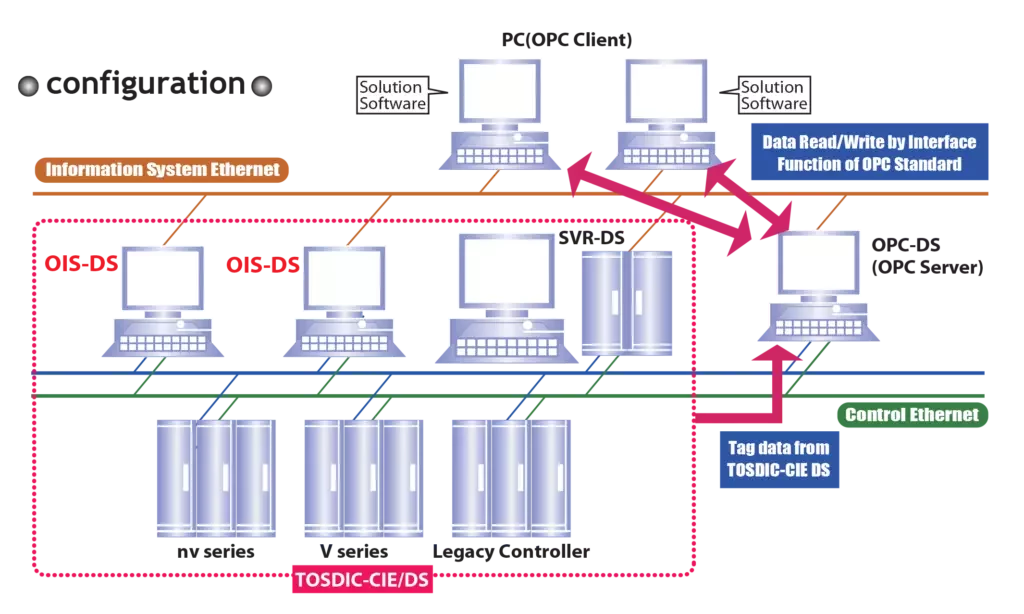
An integrated touchscreen HMI can also help simplify automation architecture. Instead of designing around multiple separate interface components, engineers can specify a complete operator interface that communicates with the PLC, controller, or plant network.
This is useful for machine-level control panels, packaged equipment, process skids, pump stations, utility systems, manufacturing cells, and industrial panel computers for automation systems.
Cleaner architecture can reduce potential failure points, simplify documentation, and make systems easier to maintain over time. For facilities modernizing older equipment, integrated HMI systems may also provide a practical upgrade path from pushbutton-heavy panels to more flexible digital operator interfaces.
Improved Standardization Across Equipment
Facilities with multiple machines, lines, or process areas benefit from standardized operator interfaces. When screens use consistent navigation, color conventions, alarm structures, and terminology, operators can move between systems with less confusion.
Standardized integrated touchscreen HMI systems can help support consistent operator training, easier troubleshooting, better alarm response, reduced engineering time, more predictable spare parts needs, and improved long-term support.
This is especially important for manufacturers and OEMs that deploy similar systems across multiple locations or customers.
👉 Simplify panel design and improve operator access to real-time data with integrated touchscreen HMI and process control solutions from Clipper Controls.
Panel Mount HMI Displays for Control Panels
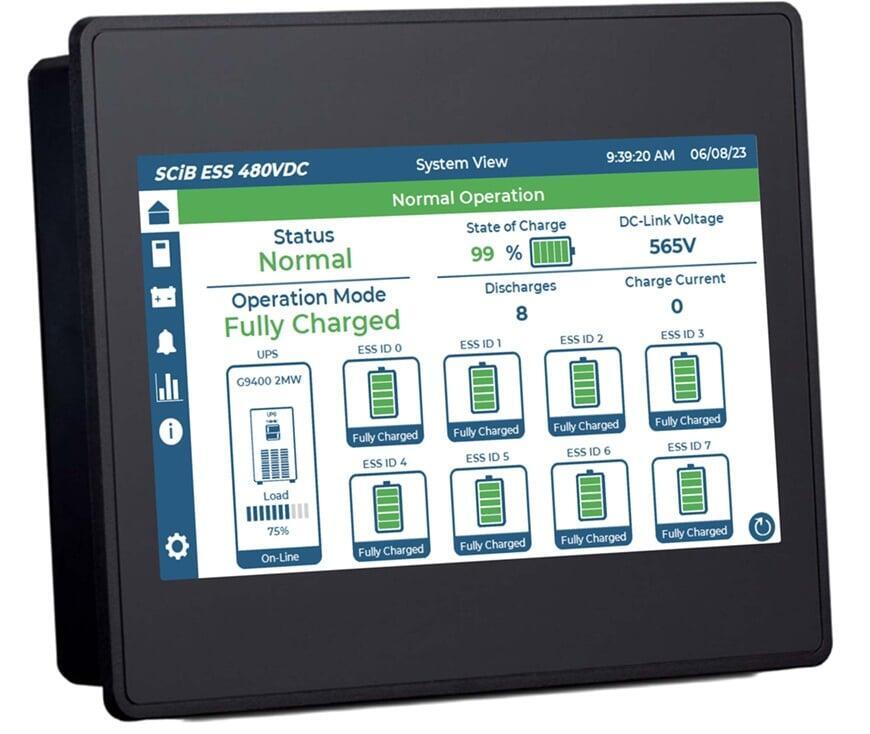
A panel mount HMI display is one of the most common configurations for industrial automation. By mounting the HMI directly into the control panel door or enclosure, operators get convenient access to equipment controls while sensitive electronics remain protected inside the panel.
Panel-mounted designs are widely used in machine automation, process control, packaged equipment, and OEM systems because they create a clean, durable, and space-efficient operator interface.
Why Panel Mount Designs Are Common
Panel mount HMI screens provide a practical balance of accessibility and protection. The operator interacts with the touchscreen from the outside of the enclosure, while wiring, power connections, controllers, and other components remain secured inside.
This design supports clean control panel integration, reduced panel door clutter, better protection for internal electronics, easier operator access, more efficient use of enclosure space, and a professional OEM equipment appearance.
Compared with separate desktop monitors or external operator stations, panel mount displays are often easier to integrate into compact machine designs. They also support repeatable panel layouts for machine builders and panel shops.
Industrial Panel Mount Touch Screen Monitor Applications
An industrial panel mount touch screen monitor can be used anywhere operators need a durable, accessible interface for machine or process control. These devices are common in both discrete manufacturing and process automation environments.
Typical applications include packaging machines, pump control panels, water and wastewater systems, chemical feed systems, process skids, batch control panels, food and beverage production lines, material handling systems, compressor and blower panels, and OEM equipment packages.
A panel mount touchscreen monitor for industrial automation may be connected to an industrial computer, PLC-based HMI platform, or SCADA workstation, depending on the system architecture.
Design Considerations for Panel Mount HMI Displays
- The selected display must fit the available panel space while leaving enough room for other devices, labels, wiring, and service access. In dusty, wet, or washdown environments, the front of the display must provide appropriate protection once installed.
- Screen size and resolution should match the complexity of the system. Simple equipment may only need a compact screen, while complex systems may require larger displays with room for trends, alarms, and process graphics.
- Touch operation is also important. Operators may need to use the screen while wearing gloves, working in wet areas, or interacting with the panel in high-vibration environments.
- Power, communication, video, and USB touch connections should be accessible for installation and maintenance. Panel-mounted electronics also generate heat, so enclosure temperature and ventilation should be considered during design.
- Maintenance teams should be able to access connectors, replace components, and troubleshoot the display without unnecessary downtime.
Supporting Better Control Panel Design
For control panel designers and panel shop managers, the HMI display affects both function and layout. A well-selected panel mount HMI can reduce the number of separate devices on the panel door, simplify wiring, and improve the appearance of the finished system.
For plant teams, a properly mounted HMI improves usability. Operators can stand in front of the equipment, view system status, interact with controls, and respond to alarms without needing to open the enclosure or access internal components.
For OEMs and system integrators, panel mount displays also support repeatability. Once the right platform is selected, similar equipment can use consistent screen sizes, cutouts, wiring practices, and operator interface standards.
👉 Designing or upgrading a control panel?
Clipper Controls can help specify panel mount HMI displays, industrial touch screen monitors, and Toshiba touchscreen solutions for your application.
How to Choose an HMI Touch Panel
Match the HMI to the Application
- A machine-level HMI may focus on machine status, fault reset, mode selection, recipe selection, production count, and maintenance prompts.
- A process-control HMI may need to display flow rate, pressure, temperature, level, valve status, pump status, alarm history, and trend data.
- An OEM equipment interface may need to balance functionality with repeatability, compact size, ease of commissioning, and long-term product availability. A plant-wide or SCADA-connected system may require more advanced communication, user access levels, and data visibility.
Select the Right Screen Size
Screen size should be based on operator needs, not just available panel space. A small display may be enough for simple equipment, but it can become difficult to use when operators need to view trends, alarms, setup menus, or multiple pieces of equipment on one screen.
When selecting screen size, consider the number of process variables displayed, screen navigation requirements, alarm and trend visibility, operator viewing distance, available panel space, glove use, font size, readability, and complexity of the machine or process.
For simple machine control, a compact HMI may be practical. For process automation, batch control, or multi-equipment systems, a larger HMI display may improve visibility and reduce screen navigation.
Confirm PLC and Network Compatibility
An HMI touch panel must communicate reliably with the PLC, controller, or automation network. Before selecting hardware, confirm that the HMI supports the required communication drivers, protocols, ports, and software environment.
Important compatibility questions include:
- What PLC or controller will the HMI communicate with?
- Does the HMI support the required industrial protocol?
- Is Ethernet, serial, USB, or another connection required?
- Will the HMI communicate with one controller or multiple devices?
- Is SCADA or historian integration required?
- Are remote access or data logging features needed?
- Does the HMI software support the required graphics, alarms, and user security?
Controls engineers and HMI programmers should also consider how the screen will be developed, backed up, updated, and supported over time. A device that works well technically but is difficult to program or maintain may increase lifecycle costs.
Evaluate the Operating Environment
A rugged HMI screen for manufacturing environments must withstand the conditions around the equipment. Commercial displays are generally not designed for the temperature, vibration, dust, moisture, and electrical noise commonly found in industrial plants.
Environmental factors to evaluate include ambient temperature, humidity, dust or particulate exposure, washdown or water spray, chemical exposure, vibration, shock, sunlight or glare, electrical noise, and indoor or outdoor installation.
In food and beverage, water treatment, chemical processing, or washdown areas, front-panel sealing and enclosure compatibility may be especially important. In outdoor or high-glare applications, brightness and viewing angle may become critical. In manufacturing areas with vibration or continuous operation, industrial-grade construction and long lifecycle support should be prioritized.
Consider Touchscreen Usability
Touchscreen performance directly affects operator experience. The best HMI hardware is not only rugged; it must also be usable in the real working environment.
Consider whether operators will use the screen with bare hands, gloves, wet hands, stylus input, frequent repeated touches, or dirty and dusty fingers.
Touch target size, screen layout, button spacing, and confirmation prompts are also important. A poorly designed screen can cause accidental inputs or slow operation, especially during alarms or high-pressure production conditions.
For critical actions, HMI programmers may include confirmation dialogs, role-based access, or separate maintenance screens to reduce unintended changes.
Plan for Lifecycle and Support
Industrial automation systems often remain in service for many years. For that reason, lifecycle planning is an important part of HMI selection.
Before selecting an HMI touch panel, consider product availability, replacement options, software support, firmware updates, spare parts strategy, documentation, local technical support, and compatibility with future upgrades.
For OEMs and machine builders, consistent product availability can be especially important. Changing HMI platforms midstream may require redesigning panel cutouts, updating software, modifying documentation, and retraining support teams.
Working with an automation partner can help teams evaluate these requirements before purchasing hardware. Clipper Controls supports customers with product selection, application assistance, and technical guidance for instrumentation displays, process controls, and automation systems.
Five Questions to Ask Before Choosing an HMI Touch Panel
Before selecting an HMI touch panel, ask:
- What equipment or process will operators control?
- What PLC or automation platform must it communicate with?
- What screen size and resolution are needed for safe, efficient operation?
- What environmental conditions will the HMI face?
- How long must the hardware remain supported?
Answering these questions early helps engineers and buyers choose an HMI platform that supports both immediate project requirements and long-term operational goals.
👉 Not sure which HMI touch panel fits your machine, process, or control panel?
How to Select an Industrial Touch Screen Monitor
Understanding how to select an industrial touch screen monitor is important when the application requires a rugged display with operator input, but the computing or control platform is separate from the monitor. These devices are often used with industrial computers, SCADA stations, remote operator terminals, and control panel installations.
Unlike office-grade monitors, industrial touch screen monitors are designed for more demanding environments. They may need to withstand continuous operation, vibration, temperature variation, dust, moisture, and repeated operator interaction.
Environmental Rating
Touch Technology
The two most common options are resistive touch and projected capacitive touch.
- Resistive touchscreens respond to pressure. They can often be used with gloves or a stylus, making them useful in industrial environments where operators may not use bare hands.
- Projected capacitive touchscreens are common in modern touchscreen devices and can support smooth, responsive interaction. Depending on the design, they may support multi-touch gestures and durable glass surfaces.
The best option depends on how operators interact with the screen. Glove use, moisture, dirt, precision input, cleaning practices, and expected touch frequency should all be considered.
Brightness and Viewing Angle
Durability and Industrial Construction
Mounting and Connectivity
Matching the Monitor to the Application
👉 Choosing between an HMI touch panel, industrial monitor, or industrial touch screen monitor?
Common Applications for Industrial HMI Displays
Manufacturing Systems
Process Automation
OEM Equipment
Machine Control
Maintenance and Diagnostics
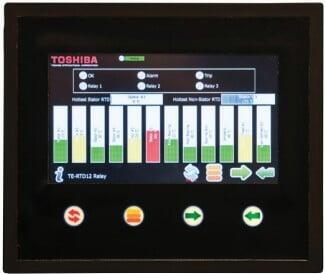
Control Rooms and Remote Operator Stations
Utility and Infrastructure Systems
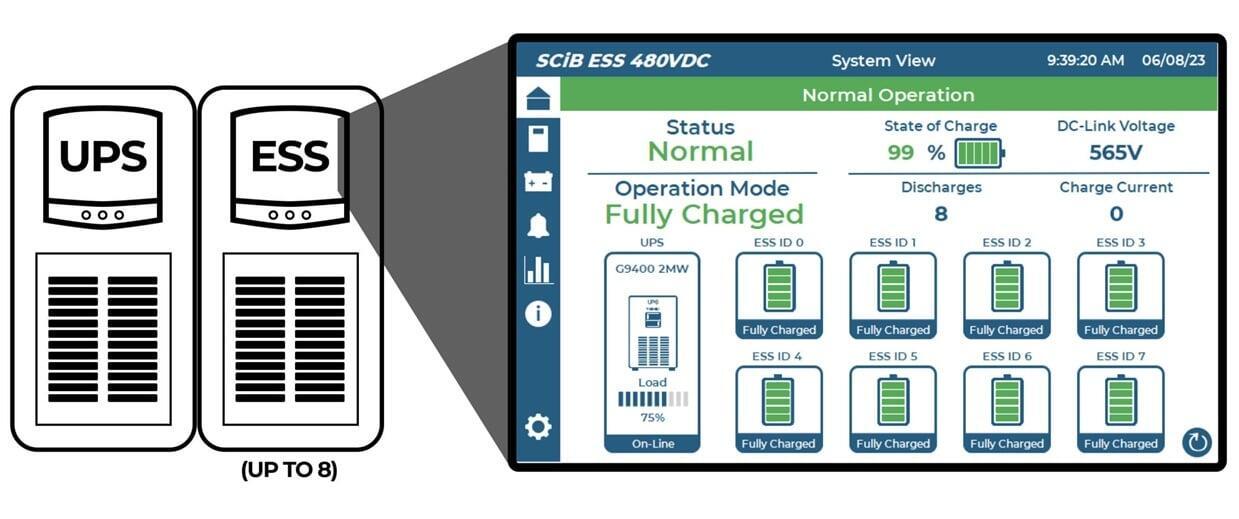
Matching the Display to the Application
👉 Improve machine visibility, process control, and operator response with industrial HMI display and automation solutions from Clipper Controls.
Call (844) 880-2469 or contact Clipper Controls to discuss your HMI application.
Toshiba HMI Screen and Industrial Display Solutions
Toshiba Automation Hardware for Control Systems
Toshiba HMI Screen Solutions
Toshiba Industrial Display and Monitor Solutions
Toshiba Touch Panel Computer and Panel Mount Touchscreen Solutions
Control panels often need compact, durable, and easy-to-use operator interfaces. Toshiba panel mount touchscreen solutions can support applications where the HMI must be integrated into an enclosure door, machine panel, or operator station.
A panel-mounted interface can help protect internal electronics while keeping controls accessible to operators. It also supports a clean panel layout, especially when the touchscreen replaces multiple pushbuttons, meters, selectors, and indicators.
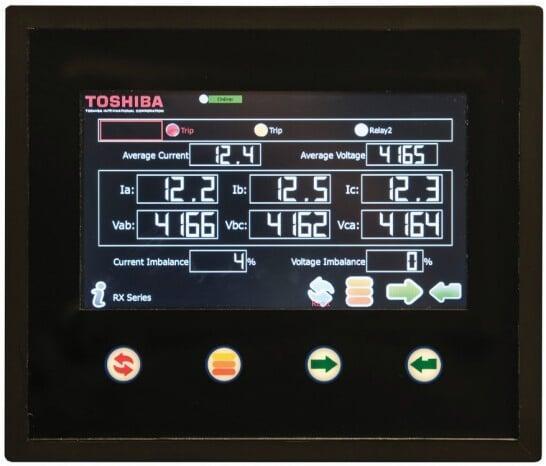
When evaluating Toshiba touch panel computer solutions or HMI hardware for a panel-mounted system, engineers should consider panel cutout dimensions, screen size and resolution, front-panel sealing, touchscreen usability, PLC communication, software environment, power requirements, enclosure temperature, service access, and long-term replacement strategy.
These considerations are especially important for OEMs and machine builders that need repeatable panel designs across multiple systems.
Toshiba Integrated Touchscreen HMI Solutions
Toshiba integrated touchscreen HMI solutions can help simplify operator interface design when the project requires a complete local interface for control, monitoring, diagnostics, and data access. Instead of treating the display as an isolated component, teams can specify the HMI as part of the broader automation system.
Integrated touchscreen HMI systems may support PLC-based machine control, local alarm display, process status screens, operator setpoint adjustment, trend and diagnostic views, recipe or batch interaction, equipment runtime information, and data handoff to SCADA or plant systems.
Where Toshiba HMI Solutions Fit Best
Toshiba HMI and automation solutions are a strong fit for projects where operators need reliable local visibility and control as part of a larger automation platform. These applications may include manufacturing systems, water and wastewater facilities, utility systems, pump control panels, packaged equipment, and process automation environments.
For plant teams, the benefit is improved access to system information. For OEMs, the benefit is a more repeatable and supportable operator interface. For system integrators, the benefit is a cleaner path to connect control logic, display graphics, alarms, and operator functions.
The best results come from selecting the HMI, PLC, communication strategy, and panel design together. Clipper Controls can help customers evaluate Toshiba HMIs and related automation solutions in the context of the full application, not just the screen specification.
👉 Planning a control panel, machine interface, or automation upgrade?
Call (844) 880-2469 or contact Clipper Controls to discuss Toshiba HMI screens, industrial displays, panel mount touchscreen options, and integrated touchscreen HMI solutions.
HMI Screen Selection Checklist
1. Define the Application
Start by identifying the primary role of the HMI. A local machine interface, process control display, SCADA operator station, and OEM equipment panel may all require different hardware and software features.
Key questions include:
- Is the HMI used for machine control, process monitoring, or both?
- Will operators use it continuously or only during setup and troubleshooting?
- Does the interface need alarm handling, trends, recipes, or user access levels?
- Is the system standalone or connected to a larger plant network?
- Will the HMI support one machine or multiple pieces of equipment?
A clear application definition helps narrow the selection before comparing specific hardware models.
2. Select the Right Screen Size and Resolution
3. Confirm PLC and Communication Compatibility
4. Evaluate the Installation Environment
5. Choose the Right Mounting Style
6. Review Touchscreen Requirements
7. Plan for Software and HMI Development
The HMI hardware must support the software environment required for the project. This includes graphics development, PLC drivers, alarm handling, trends, recipes, user security, backup procedures, and future updates.
Important software questions include:
- What HMI development platform is required?
- Does the system need custom graphics?
- Are trends, alarms, and reports required?
- Will recipes or batch functions be used?
- Are user roles and passwords needed?
- How will programs be backed up and restored?
- Who will maintain the HMI application after startup?
An HMI that is easy to program, document, and support can reduce engineering time and long-term maintenance costs.
8. Consider Lifecycle and Support
Industrial automation systems often operate for years, sometimes decades. Lifecycle support should be part of the purchasing decision.
Evaluate product availability, replacement path, spare parts strategy, software support, firmware updates, documentation, technical assistance, and compatibility with future upgrades.
For OEMs, panel shops, and machine builders, lifecycle planning is especially important. A stable HMI platform can reduce redesign work, support repeatable equipment builds, and simplify customer support.
9. Match the HMI to the Broader Automation Strategy
The HMI should support the facility’s long-term automation goals. For some systems, a basic local display may be sufficient. For others, an integrated touchscreen HMI, industrial panel computer, or SCADA-connected operator station may provide better long-term value.
Consider whether the system may eventually require remote monitoring, data logging, production dashboards, preventive maintenance alerts, Industrial IoT connectivity, SCADA integration, edge computing, expanded diagnostics, or additional operator stations.
Thinking beyond the immediate project can help prevent unnecessary redesigns later.
10. Work With an Experienced Automation Partner
The right HMI selection depends on more than specifications alone. Application requirements, operator workflow, control system architecture, environmental conditions, and lifecycle expectations all need to be reviewed together.
Clipper Controls can help customers evaluate HMI screens, industrial displays, Toshiba automation solutions, panel mount touchscreen options, process controls, and related instrumentation. By reviewing the complete application, engineers and buyers can choose a solution that supports reliable operation, clear visibility, and long-term automation performance.
👉 Need help choosing an HMI screen, industrial monitor, or integrated touchscreen HMI?
Contact Clipper Controls for application guidance and product selection support.
Choosing the Right HMI Screen for Long-Term Automation Performance
About Clipper Controls
Ready to improve operator visibility, control panel design, or machine interface performance?
👉 Contact Clipper Controls to discuss HMI screens, industrial displays, Toshiba automation solutions, and panel mount touchscreen options for your application.
Frequently Asked Questions About HMI Screens
Explore Similar Pages: Instrumentation Display Solutions | Toshiba | Programmable Logic Controllers | Process Controls | Industrial Automation Solutions | Variable Frequency Drives
Page Navigation Links
- What Is an HMI Screen?
- Why HMI Screens Matter in Industrial Automation
- HMI Touch Panel vs. Industrial Monitor vs. Industrial Panel Computer
- Benefits of Integrated Touchscreen HMI Systems
- Panel Mount HMI Displays for Control Panels
- How to Choose an HMI Touch Panel
- How to Select an Industrial Touch Screen Monitor
- Common Applications for Industrial HMI Displays
- Toshiba HMI Screen and Industrial Display Solutions
- HMI Screen Selection Checklist
- Choosing the Right HMI Screen for Long-Term Automation Performance
- Frequently Asked Questions About HMI Screens


 Toll Free
